Please copy and paste the banner code and put my blog on your blog. After that, please fill in the comment box if you are installing it. and I will put your banner here.
READ MORE - Link and PIN Exchange
Thursday, March 21, 2013
Wednesday, March 20, 2013
Baamboo Player Premium 3.5 for BlackBerry
Baamboo Player Premium v3.5 - Fantastic music lyrics player with many useful features
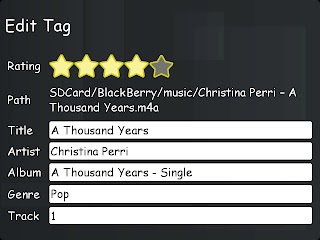
- Allow editing metadata (ID3 tag) in mp3 files (title, album, artist, ...)
- Browse music by folders, exclude folders that you don't want to load.
- Multi songs selection for playling.
- Control the now playing list: add and remove songs, select to play/pause a song.
- Sleep timer.
- Auto search missing album cover art.
- Sync the lyrics while music playing, auto search for missing lyrics for English, Korean (Romanization), Indonesian songs.
- Load lyrics from .lrc file (.lrc can be gotten from Minilyrics program on PC)
- Save cover art to your mp3 file so that other players can show it.
- BBM™ function: post playing song title to BBM™ profile status.
- Change playback time by select a line in the lyrics.
- Repeater on lyrics: play a focus part of a song repeatedly by choosing start and end line in the lyrics.
Version: 3.5
File Size: 2 MB
Required: 5.0.0 or higher
Download Baamboo Player Premium v3.5
OTA
Offline
This app serial just for evaluate, if you like the app please buy from AppWorld. ;)
BlackBerry World
https://appworld.blackberry.com/webstore/content/121016/
READ MORE - Baamboo Player Premium 3.5 for BlackBerry

- Allow editing metadata (ID3 tag) in mp3 files (title, album, artist, ...)
- Browse music by folders, exclude folders that you don't want to load.
- Multi songs selection for playling.
- Control the now playing list: add and remove songs, select to play/pause a song.
- Sleep timer.
- Auto search missing album cover art.
- Sync the lyrics while music playing, auto search for missing lyrics for English, Korean (Romanization), Indonesian songs.
- Load lyrics from .lrc file (.lrc can be gotten from Minilyrics program on PC)
- Save cover art to your mp3 file so that other players can show it.
- BBM™ function: post playing song title to BBM™ profile status.
- Change playback time by select a line in the lyrics.
- Repeater on lyrics: play a focus part of a song repeatedly by choosing start and end line in the lyrics.


File Size: 2 MB
Required: 5.0.0 or higher
If you already have Old Key (Baamboo Player Premium v3.3), use it
OTA
Offline
This app serial just for evaluate, if you like the app please buy from AppWorld. ;)
BlackBerry World
https://appworld.blackberry.com/webstore/content/121016/
Saturday, March 16, 2013
Trik Instal Aplikasi BlackBerry Via PC Beberapa Aplikasi Sekaligus
Trik Instal Aplikasi BlackBerry Via PC Beberapa Aplikasi Sekaligus - Kali ini saya akan memberi informasi Tips dan Trik Install Aplikasi BlackBerry via PC beberapa Aplikasi sekaligus .
Ok langsung TKP
Bahan :
1. BlackBerry Master Control
Program (atau jg bisa BBSAK tapi saya menngunakan BBMaster Control Progam ) bisa
download Disini
2.
Aplikasi BlackBerry : bisa
download di Blog ini
3.
Driver BlackBerry ( Bagi PC
yang gak bisa terdeteksi PIN nya bisa Download ) Download Disini
4.
Kabel USB BlackBerry
Langkah :
1.
Download BBSAK dan Install
BBSAK
2.
Extract Aplikasi yang di
download
3.
Buat folder baru terserah
di mana saja beri nama “Aplikasi” atau sesuka anda Lalu Copy file COD aplikasi
yang di extract tadi kedalam SATU folder “Aplikasi” Seperti gambar di Bawah
ini.
Sebagai contoh saya install 3 aplikasi
sekaligus yaitu , unrar , xcontact , xplayer dan game woody woodpacker.
4.
Lalu tancapkan BlackBerry
anda ke USB pilih Drive USB di bb anda
5.
Buka BlackBerry Master
Control Program yang Sudah di install tadi, jika sudah tersambung biasanya PIN
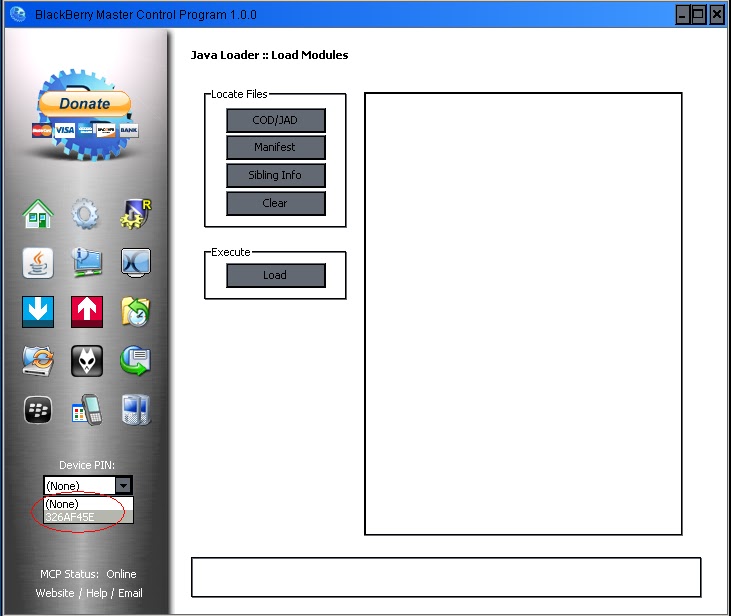
kita muncul seperti gambar di bawah ini (
Jika tidak muncul mungkin driver belum terinstal ) :
6.
Langkah selanjutnya Klik
tanda Panah Biru Kebawah , Lalu Klik COD/JAD ., Setelah muncul kotak dialog
pilih file COD yang Berada di Folder “Aplikasi” pilih semua sekaligus lebih
cepat tekan CTRL + A lalu pilih Open.
Lebih jelas lihat gambar di bawah.
7.
Lalu Pilih LOAD Tunggu
Sampai selesei (JANGAN CABUT USB ) tunggu sampe Restart sendiri dan Aplikasi
pun langsung terinstal di BlackBerry Anda